# United States GovMatch
Incode GovMatch is an identity verification solution that securely confirms identity against state Department of Motor Vehicles (DMV) issuing databases in real time. GovMatch supports two complementary methods to verify a user:
- [DMV Face Match](#dmv-face-match): Performs a one-to-one biometric comparison of a user’s live selfie and submitted personal information against the photo and identity record held in a participating state DMV database.
- [DMV Data Match](#dmv-data-match): Verifies user-submitted identity attributes (including name, date of birth, and document details) against the corresponding DMV record.
As shown in the following map, most states support one of these methods and some states support both. The Incode module determines which method to use based on the state issuing the ID. When both methods are provisioned, priority is given to the DMV Face Match method.
***
## Verification Methods
### DMV Face Match
DMV Face Match is Incode’s direct connection to state DMV systems for biometric face comparison. During verification, the supported document data fields are sent to the DMV. If the document data fields match to a record within the DMV database, the uploaded selfie is compared against the official portrait stored in the state’s DMV database. A successful Face Match guarantees that the Data Match also passed, and provides the highest level of assurance that the person presenting the document is the legitimate holder.
- **Provider**: Direct Incode-to-DMV integration
- **Supported States**: AZ, CA, MS, VA
- **Verification method**: Biometric face matching against DMV photo on file & certain fields required by states.
For more, see [DMV Face Match Technical Details](/general-reference/dmv-face-match-technical-details/).
### DMV Data Match
DMV Data Match is Incode’s data verification service through AAMVA or through validation of Verifiable Credentials. During verification, the supported document data fields are validated against the data on the record held by the issuing state’s DMV.
- **Provider**: AAMVA network, validation of Verifiable Credentials
- **Supported States**: 45 states (all _except_ AK, CA, LA, MN, PA, UT)
- For most current state AAMVA provider state coverage information, visit [the AAMVA website](https://aamva.org/it-systems-participation-map?id=594).
- **Verification method**: Data field matching against authoritative DMV records
For more, see [DMV Data Match Technical Details](/general-reference/dmv-data-match-technical-details/).
#### Known State-Level Integration Differences Between Participating DMV Data Match States
Because each state has its own independent DMV Data Match integration, data field matching availability is not consolidated to a single standard. Below are the known state-level variations as provided by the latest official AAMVA documentation.
### Note
Incode observes some discrepancy cases in production that are pending official confirmation by AAMVA.
| State | Notes |
| ----- | :--------------------------------------------------------- |
| AZ | Not supported |
| DE | Not supported |
| ID | Not supported |
| KY | Not supported |
| MI | Not supported |
| ME | Not supported |
| NE | Not supported |
| NM | Not supported |
| NC | Not available if person previously held a Driver's License |
| RI | Not supported |
| TX | Not supported on ID cards issued pre-2009 |
| VA | Not supported |
| WI | Not supported |
| State | Reason |
| ----- | :-------------------------------------------- |
| AZ | AZ issues ID cards without an expiration date |
| DE | Data field not available for verification |
| ID | Data field not available for verification |
| KY | Data field not available for verification |
| ME | Data field not available for verification |
| MI | Data field not available for verification |
| NE | Data field not available for verification |
| NJ | Data field not available for verification |
| NM | Data field not available for verification |
| NC | Data field not available for verification |
| RI | Data field not available for verification |
| TX | Data field not available for verification |
| VA | Data field not available for verification |
| WI | Data field not available for verification |
| State | ID Type | Issue | Impact |
| ----- | :----------------------------- | :---------------------------------------------------- | :------------------------------------------------- |
| CO | Some ID cards | Some have no expiration date (criteria not specified) | Cannot verify |
| FL | Some ID cards | Some have no expiration date (criteria not specified) | Cannot verify |
| IL | ID cards and Driver's Licenses | Temporary credentials | Cannot verify issue date on temporary credentials |
| MA | ID cards and Driver's Licenses | Replacement/duplicate cards | New issue date printed but database keeps original |
| MA | Pre-2010 ID cards | No expiration date | Cannot verify |
| RI | Old cards | No expiration date | Cannot verify |
| WY | Very old ID cards | No expiration date | Cannot verify |
These states issue ID cards without expiration dates for certain age groups:
| State | Age Threshold | Card Type | Notes |
| ----- | ------------- | ---------------- | -------------------------------------------- |
| AL | 62+ | Non-REAL ID only | REAL ID cards always have expiration |
| AR | 60+ | Non-REAL ID only | REAL ID cards always have expiration |
| IL | 65+ | All ID cards | No expiration for seniors |
| MO | 70+ | Some ID cards | Varies by individual |
| OK | 65+ | Non-REAL ID only | Shows "INDEF"; REAL ID has 4/8 year validity |
| TN | 65+ | Non-REAL ID only | REAL ID cards always have expiration |
| TX | 60+ | All ID cards | No expiration for seniors |
These states reuse the original issue date even on replacement cards:
- AL
- AR
- DC
- FL
- IN
- MS
- NJ
- SC
- TX (for "Remade" cards only)
***
## Module Configuration
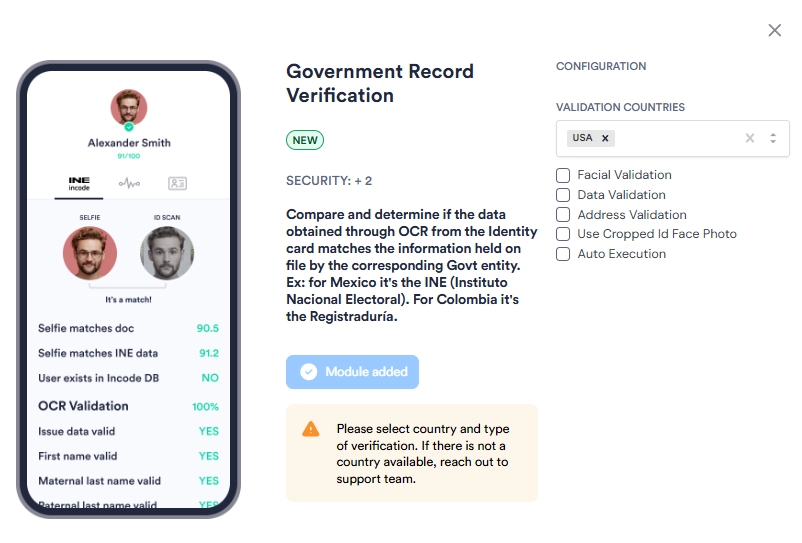
You can add GovMatch to your [Workflows](/dashboard-platform-administration/workflows-20/) or [Flows](/dashboard-platform-administration/flows-1/) as a module. Then you can configure the module settings to select the applicable fields for the input data and/or face you would like to collect from the end user. Documentation for these configuration settings is coming soon.
***
## Single Session Dashboard Result
**DMV Face Match**
**DMV Data Match**
### Interpreting GovMatch Results
For each check performed, one of the following 3 statuses is returned:
| **Status** | **Description** | **Notes** |
| ---------- | :----------------------- | --------------------------------------------------------------------------------------- |
| `OK` | Exact Match Verified | Session face or data field is an exact match to DMV records |
| `FAIL` | Exact Match Failed | Mismatch between session face or data field and DMV records |
| `UNKNOWN` | Verification unavailable | Data field is not supported by the state, OR data field is unavailable for verification |
For more specific information on scoring and response details, see either [DMV Face Match](/general-reference/dmv-face-match-technical-details/) or [DMV Data Match](/general-reference/dmv-data-match-technical-details/).