This module looks up the end user in identity data sources from a phone number or a tax ID and returns the personal data the source holds, so it can pre-fill later steps of the onboarding. Which identifiers are needed depends on the country and source configured for the module.
Info
This is different than eKYC.
Supported with:
✅ Workflows | ✅ Flows
Before you start
The source you want to use must be enabled for your organization in its country. Contact your Incode representative to enable it. See eKYC Prefill Coverage for the available sources.
Add eKYC Pre-fill to Workflows
- In the left menu, click Flow Builder > Workflows.
- Click New or select an existing Workflow.
- Add the eKYC Prefill module. Do one of the following, depending on whether you have the New or Classic view enabled in the toggle in the top right:
- New: Click Add node
 > Modules, then search for and select eKYC Prefill.
- Classic: From the Modules list, drag and drop the eKYC Prefill module into the builder after the modules that collect user data.
- New: Click Add node
- You can click Options
 > Edit on the module node to open the Configuration Options panel and adjust settings as needed.
Add eKYC Pre-fill to Flows
- In the left menu, click Flow Builder > Flows.
- Click New or select an existing Flow.
- On the Select Modules tab, find the eKYC Prefill module and click Add.
- You can click Details & Configurations to open the Configuration Options panel and adjust settings as needed.
Configuration Options
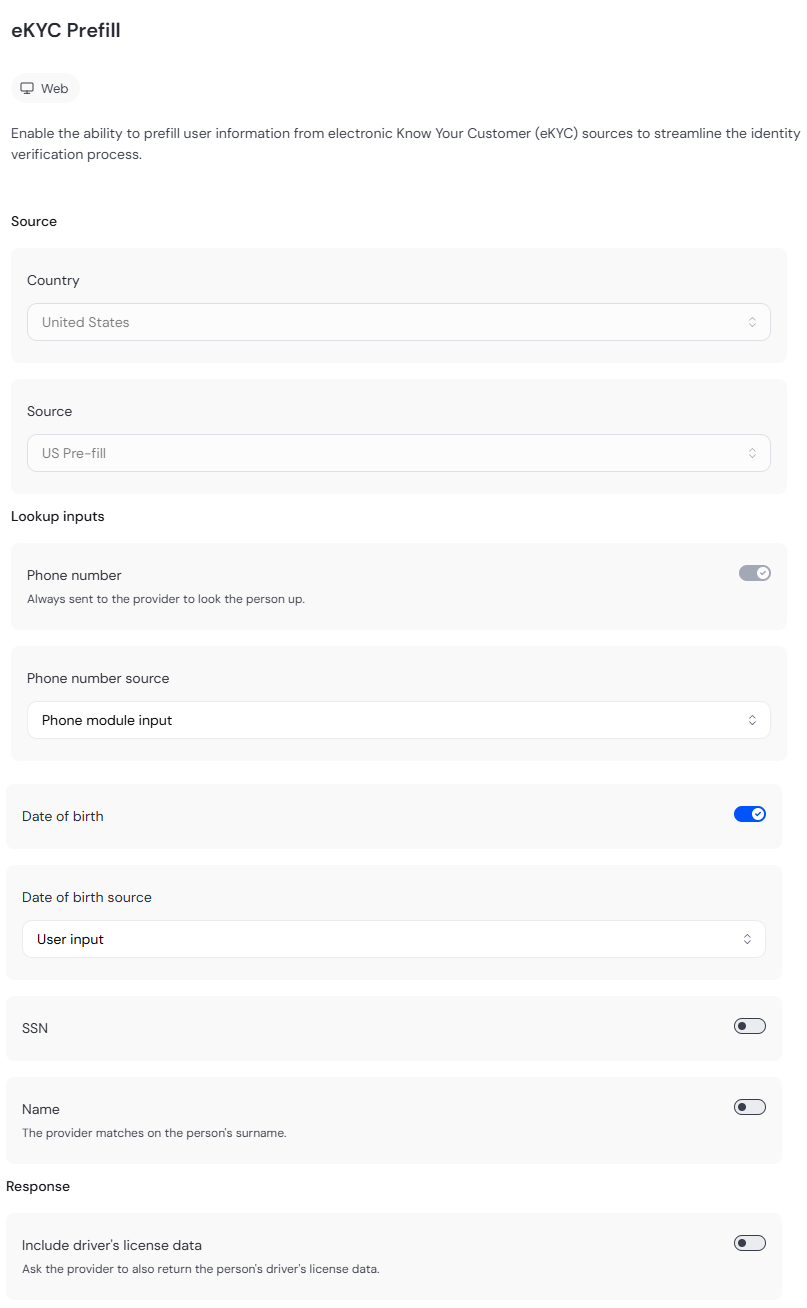
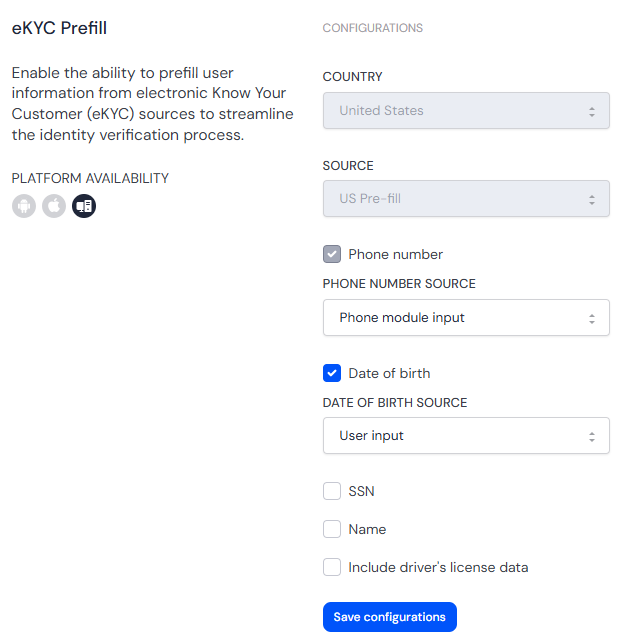
This section details all the configuration options available for this module. The configuration panel looks different depending on whether you have the New or Classic view enabled in the toggle in the top right in your Flow or Workflow. After changing anything, click Save configurations before closing the configuration panel.
The options you see in your configuration may differ from those documented here. Contact your Incode representative for more information.
Configuration panel: New view
Configuration panel: Classic view
| Option | Description | Default |
|---|---|---|
| Country | Country of the end user. Must be the country the source serves. | United States |
| Source | US Pre-fill, US Pre-fill Express or BR Pre-fill. See eKYC Prefill Coverage. | US Pre-fill |
| Phone Number | Send the phone number. Always on for the US sources, which look up by phone. | On |
| Phone number source | Where the phone number comes from. Options are Phone module input or User input. | Phone module input |
| Date of birth | Send the date of birth. US Pre-fill only. | On |
| Date of birth source | Where the date of birth comes from. Options are User input or Auto-fill from ID (OCR). This field is hidden if Date of birth is Off. | User input |
| SSN | Send the SSN. US Pre-fill only | Off |
| SSN source | Where the SSN comes from. The only option is User input. This field is hidden if SSN is Off. | User input |
| Name | Send the last name (surname). US Pre-fill only. | Off |
| Name source | Where the name comes from. Options are User input, Auto-fill from ID (OCR), or Proof of address. This field is hidden if Name is Off. | User Input |
| Include driver's license data | Return the driver's license data the source holds. US sources only. | Off |
Each source in the eKYC Prefill module uses only its own identifiers and ignores the rest.
- US Pre-fill. Phone number plus at least one of Date of Birth, SSN, or Name.
- US Pre-fill Express (coming soon). Phone number only.
- BR Pre-fill (coming soon). CPF only.
The module cannot be saved until Country matches the country the Source serves and the selected source has enough identifiers turned on to make a lookup:
| Source | Country | Identifiers required |
|---|---|---|
| US Pre-fill | United States | At least one of Date of Birth, SSN, or Name is on |
| US Pre-fill Express | United States | Phone number is on |
| BR Pre-fill | Brazil | None |
Add Conditions
Workflow Conditions are not available for this module yet. This section will be updated once they are.
View results
The single Session view shows the latest answered lookup of the session. The SSN or CPF are masked to their last 4 digits.